Aadhaar Bank Account Link Status Check: Easy 2026 Guide
A simple Aadhaar bank account link status check can explain why a subsidy, scholarship, or scheme payment never reached you, even though you believe your Aadhaar is linked to your bank. This guide explains the difference between linking and DBT seeding, how to check your status, and how to fix it if a payment is at risk.
Table of Contents

Why Your Aadhaar Bank Account Link Status Matters
Direct Benefit Transfer payments, including LPG subsidy, PM-KISAN instalments, scholarships, pension, and MGNREGA wages, are routed through a single national mapper maintained by NPCI. If your Aadhaar is not correctly seeded as the active DBT account there, your payment can fail entirely or land in an account you no longer use.
Linked vs Seeded: An Important Distinction
Your bank may show Aadhaar as “linked” to your account simply as a KYC record, but that alone does not guarantee DBT payments reach you. Only one bank account can be the active “seeded” account in the NPCI mapper at any time, and the most recently seeded account always overrides any earlier one, even if you still use the older account regularly.
What You Need Before You Check
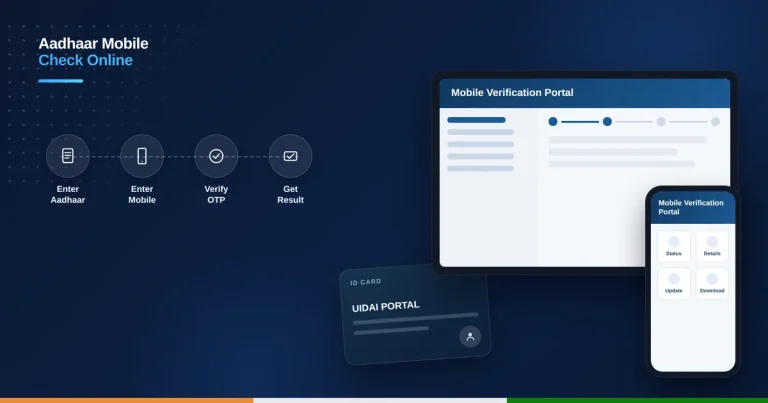
Keep your 12-digit Aadhaar number ready, along with access to the mobile number registered with Aadhaar, since the check is completed through an OTP sent to that number. No bank account number is needed to run the check itself.
How to Check Your Aadhaar Bank Account Link Status
- Visit myaadhaar.uidai.gov.in or resident.npci.org.in.
- Look for “Bank Seeding Status” or “Check Aadhaar/Bank Account Linking Status”.
- Enter your 12-digit Aadhaar number.
- Enter the captcha code shown and request the OTP.
- Enter the OTP sent to your Aadhaar-registered mobile number.
- View the result showing your bank name and whether your Aadhaar is active for DBT.
What the Result Means
An “active” status confirms that specific bank account is currently set to receive your DBT payments. An “inactive” or unexpected bank name means a different, possibly outdated account is seeded, and any subsidy or scheme payment will continue going there until you re-seed your preferred account.
How to Link or Re-Seed Your Aadhaar with Your Bank Account
You can update your DBT-seeded account by visiting your bank branch with your Aadhaar card, through net banking under the “Link Aadhaar” or e-services section, via your bank’s mobile app under account services, or at an ATM using the Aadhaar registration option. Seeding a new account automatically overrides the previous one in the NPCI mapper.
Common Issues with DBT Payments
Payments commonly fail or go missing when Aadhaar is seeded to a closed, frozen, or dormant account, when a person holds multiple accounts but only one is actively seeded, or when they switch their primary bank without re-seeding Aadhaar to the new account. Checking your status after any bank change is a good habit to avoid missed payments.
Helpline and Support
For Aadhaar-related queries, call the UIDAI toll-free helpline at 1947, available 24×7 in multiple languages. For seeding-specific issues, you can also raise a grievance through the resident.npci.org.in portal or approach your bank branch directly. If you also need to check your registered mobile number, see our Aadhaar-linked mobile number check guide.
Aadhaar Card Link vs Aadhaar Bank Account Link Status
Many users confuse two different things. Linking your Aadhaar card to a bank account for KYC purposes is not the same as your Aadhaar bank account link status for DBT. KYC-level linking can exist in multiple banks at once, but the NPCI mapper allows only one account to be active for receiving government payments at any given time.
So even if your Aadhaar is linked to two or three accounts for identity verification, only the account seeded with NPCI actually receives subsidy and scholarship transfers. Always confirm your Aadhaar bank account link status through the NPCI or myAadhaar portal, not just your bank passbook, to avoid confusion during payment failures.
Tips to Keep Your Aadhaar Bank Link Active
Check your Aadhaar bank account link status every few months, especially after changing banks or getting a new SIM card, since a deactivated mobile number can block OTP verification. Avoid closing the account that is currently seeded with NPCI unless you have already re-seeded a new one, or your DBT payments will stop immediately.
If benefits suddenly stop arriving, do not panic. First check your Aadhaar bank account link status online, then visit your bank branch with your Aadhaar and account passbook to re-seed if required. Most issues are resolved within a few working days once the correct account is mapped again in the NPCI system.
Is checking my Aadhaar bank account link status free?
Yes, checking your status on myaadhaar.uidai.gov.in or resident.npci.org.in is completely free.
Can my Aadhaar be linked to more than one bank account?
Yes, but only one account can be the active DBT-seeded account at any given time in the NPCI mapper.
Why did my subsidy go to an old bank account?
This happens when that old account is still the one seeded in the NPCI mapper, even if you no longer use it regularly.
How do I change which account receives my DBT payments?
Visit your bank branch, net banking, or mobile app and re-seed Aadhaar with your preferred account, which overrides the previous seeding.